While logged in to your My Frame Gallery, go to the "Add Frames" part of the menu.

Here, you will have a choice of how to add your frames.
1. Add Individual Frames by Frame Search
This option allows you to manually add frames one-by-one so that your gallery matches your inventory or the subset of it that you want to display.
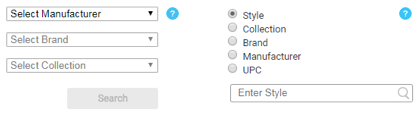
Use the search features to find the styles you wish to add. On the left, via the dropdown menus, you can search for entire manufacturers, brands, or collections at once. This is useful if you want to add multiple styles at once. For a more precise search, use the radio buttons and search bar to search by keyword.
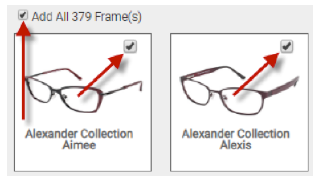
When you locate the style(s) that you wish to add, click the checkboxes to add them to your Gallery. You can also click the box at the top to “Add All Frames”.
Be sure to save your changes and then publish your updated gallery!
2. Add Brands / Collections by Auto Brand Update
This option allows you to select the brands or collections that you wish to display, and then the system will automatically update them on a weekly basis to include any newly released frames.
Click the + sign next to the manufacturer to see the Brands carried.
Click the + sign next to each Brand to see the Collections within that brand.
Click the ☑ check boxes next to each Brand or Collection to add/remove to your Gallery.
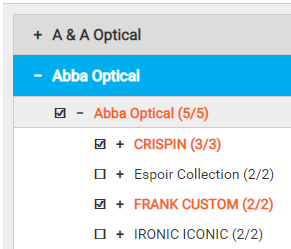
You can also click the + sign next to each Collection to display all of the styles in that Collection and uncheck any styles that you want to exclude from your Gallery.
Note that unless you manually exclude a style, we will keep your auto-brand selections up to date by adding any newly released styles within those brands to your gallery automatically.
Be sure to save your changes and then publish your updated gallery!
3. Initial Inventory Upload
If you prefer to list only the individual styles that you carry in inventory (select styles from each manufacturer’s brands), then to get you started, we offer a no charge inventory upload from a supplied excel or csv file. Please contact technical support at
[email protected] for more information.